Meet Sarah. She's managing hypertension, diabetes, and asthma. These three conditions require coordination between her primary care physician, endocrinologist, and pulmonologist. When she opens her insurance portal to review her care team and make sense of her recent claims, she sees this:
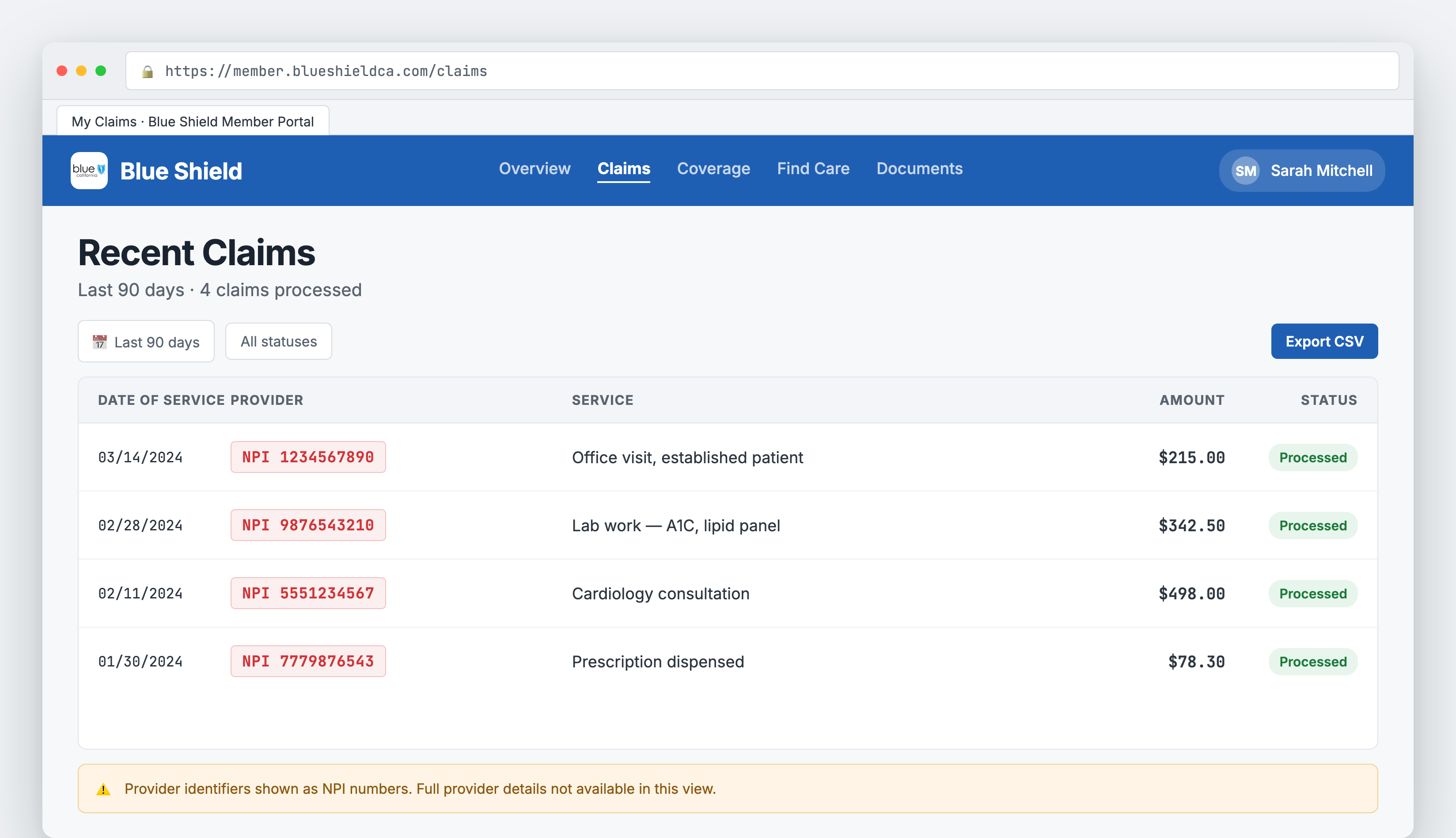
Screenshot shown for demonstrative purposes only.
Numbers. Just numbers. 1234567890, 0987654321. These National Provider Identifiers (NPIs) tell her nothing about who's treating her conditions, their specialties, or how to contact them. She can't tell which specialist ordered her latest lab work, or who she needs to call to schedule a follow-up. The insurance portal has all the data, but none of the context.
For developers, this problem is just as frustrating. Every insurance claim, referral, and clinical encounter references providers by NPI, a 10-digit number. You're expected to enrich this data yourself by calling the NPPES API, caching results, handling rate limits, and keeping records updated as providers change practices or specialties.
Don't feel like reading? Watch the video summary:
The Problem
The National Provider Identifier (NPI) is the unique 10-digit identification number for healthcare providers in the United States. Every doctor, nurse practitioner, hospital, and clinic has one.
Insurance claims, clinical records, and referrals all use NPIs to identify providers. But NPIs are opaque:
- No human-readable information: The number
1234567890could be a cardiologist in Boston or an urgent care clinic in Seattle. You can't tell from the number alone. - NPPES API required: To get provider details, you need to query the NPPES NPI Registry, manage your own caching, handle rate limits, and keep data fresh.
- Provider data goes stale: Doctors change specialties, move practices, and update contact information. You need a refresh strategy.
- Missing context: Is this provider treating the patient, or just submitting a claim? Is this their primary care doctor or a one-time specialist?
The Solution
Flexpa automatically enriches every provider reference in your FHIR data with complete practitioner and organization details from the NPPES database.
The result:
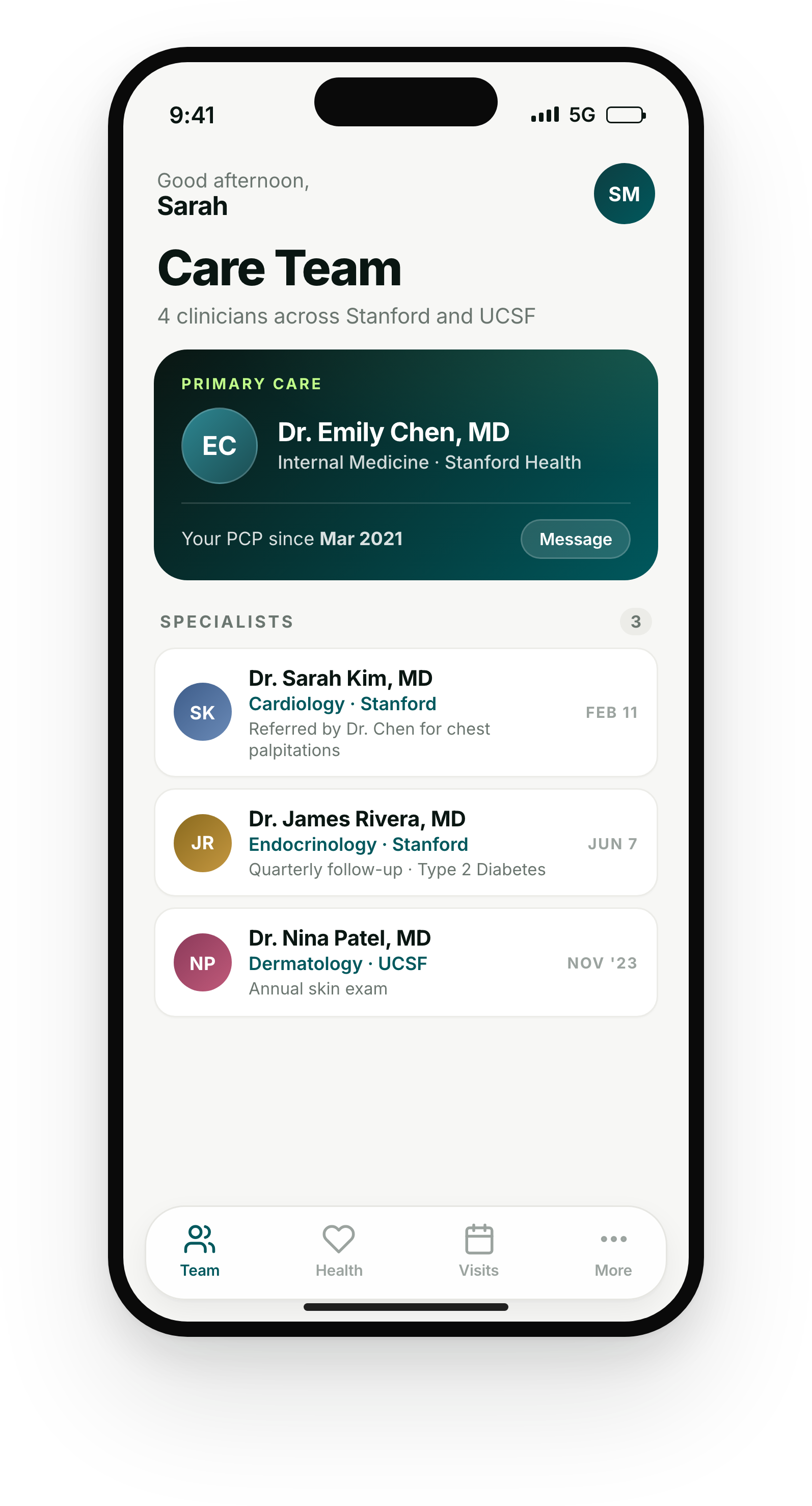
This UI is for demonstrative purposes only and does not reference any real application. It serves as inspiration for what you can build with Flexpa.
Now Sarah sees her care team: names, specialties, office addresses, and phone numbers. Everything she needs to coordinate her care.
What Gets Enriched
For individual practitioners (Type 1 NPIs), Flexpa includes:
- Full name (first, middle, last, credentials)
- Primary taxonomy/specialty (e.g., "Internal Medicine", "Cardiology")
- All additional specialties
- Practice addresses (primary and secondary)
- Phone numbers
- State license information
For organizations (Type 2 NPIs), Flexpa includes:
- Organization name
- Organization type (e.g., "Hospital", "Clinic", "Laboratory")
- Business addresses
- Phone numbers
- Authorized official information
Implementation Details
Our NPI expansion pipeline runs on every FHIR resource during transformation:
1. NPI Detection
We scan every FHIR resource for provider references with NPI identifiers (system http://hl7.org/fhir/sid/us-npi). This includes:
- Local contained references (
#practitioner-123) - Logical identifier-based references
- Display-only references (soon!)
2. NPPES Lookup
We query our NPPES database (refreshed weekly from CMS downloads) to retrieve:
- Basic provider information (name, type, enumeration date)
- Taxonomy codes (specialty classification)
- Practice locations and addresses
- Contact information
- License data
3. FHIR Resource Generation
We generate standard FHIR Practitioner (Type 1) or Organization (Type 2) resources with:
- Identifier with NPI system
- Name (HumanName for practitioners, string for organizations)
- Telecom (phone, fax)
- Address (line, city, state, postalCode)
- Qualification (for practitioners, including specialty)
4. Bundle Entry Creation
Unlike the traditional FHIR contained resource pattern, we create separate bundle entries for each provider resource. This approach:
- Extracts contained resources: If the payer data includes a
containedPractitioner or Organization with an NPI, we extract it into its own bundle entry and remove it from thecontainedarray - Enables deduplication: The same provider referenced across multiple claims appears as a single resource in the bundle
- Supports direct queries: Providers become first-class resources that can be queried independently
API Usage
Every Claim, ExplanationOfBenefit, and Encounter automatically includes provider details as separate bundle entries:
// Fetch all claims for a patient
const response = await fetch('https://api.flexpa.com/fhir/ExplanationOfBenefit', {
  headers: { 'Authorization': `Bearer ${accessToken}` }
});

// Example bundle with NPI expansion
{
  "resourceType": "Bundle",
  "type": "collection",
  "entry": [
    // Provider as a separate bundle entry
    {
      "fullUrl": "urn:uuid:...",
      "resource": {
        "resourceType": "Practitioner",
        "identifier": [{
          "system": "http://hl7.org/fhir/sid/us-npi",
          "value": "1234567890"
        }],
        "name": [{
          "family": "Smith",
          "given": ["Jane", "Marie"],
          "suffix": ["MD"],
          "text": "Dr. Jane Marie Smith, MD"
        }],
        "telecom": [{
          "system": "phone",
          "value": "617-555-0123"
        }],
        "address": [{
          "line": ["123 Medical Plaza"],
          "city": "Boston",
          "state": "MA",
          "postalCode": "02115"
        }],
        "qualification": [{
          "code": {
            "coding": [{
              "system": "http://nucc.org/provider-taxonomy",
              "code": "207RC0000X",
              "display": "Internal Medicine, Cardiovascular Disease"
            }]
          }
        }]
      }
    },
    // Claim referencing the provider
    {
      "resource": {
        "resourceType": "ExplanationOfBenefit",
        "id": "eob-123",
        "provider": {
          "reference": "Practitioner?identifier=http://hl7.org/fhir/sid/us-npi|1234567890&_tag=...",
          "display": "Dr. Jane Marie Smith, MD"
        }
      }
    }
  ]
}
Access provider details from claims:
// Get all providers from a patient's claims
const response = await fetch(
  'https://api.flexpa.com/fhir/ExplanationOfBenefit',
  {
    headers: { 'Authorization': `Bearer ${accessToken}` }
  }
);

// Parse the JSON bundle
const bundle = await response.json();

// Extract unique providers from bundle entries
const providers = new Map();

if (bundle && Array.isArray(bundle.entry)) {
  bundle.entry.forEach(({ resource }) => {
    if (resource.resourceType === 'Practitioner' ||
        resource.resourceType === 'Organization') {
      const npi = resource.identifier?.find(
        id => id.system === 'http://hl7.org/fhir/sid/us-npi'
      )?.value;

      if (npi && !providers.has(npi)) {
        providers.set(npi, {
          npi,
          name: resource.resourceType === 'Practitioner'
            ? resource.name?.[0]?.text
            : resource.name,
          specialty: resource.qualification?.[0]?.code?.coding?.[0]?.display,
          phone: resource.telecom?.find(t => t.system === 'phone')?.value,
          address: resource.address?.[0]
        });
      }
    }
  });
}

// Result: Map of all providers with complete details
// Map {
//   "1234567890" => {
//     npi: "1234567890",
//     name: "Dr. Jane Marie Smith, MD",
//     specialty: "Internal Medicine, Cardiovascular Disease",
//     phone: "617-555-0123",
//     address: { line: ["123 Medical Plaza"], city: "Boston", ... }
//   },
//   ...
// }
Get Started
NPI expansion is live for all Flexpa customers. Every provider reference includes complete practitioner and organization details automatically.
- Read the Provider Expansion documentation
- View Practitioner resource schema
- View Organization resource schema
- Learn about NPI from CMS
- Pull your own health records
- Schedule a demo
This is Day 1 of Flexpa Flux Launch Week. Tomorrow: Understanding what conditions are being treated with automated CCIR/CCSR classification.