Most outpatient blood work in the US runs through two national labs, Quest Diagnostics and Labcorp. If your app or AI agent helps people understand their health, lab results are often the records they want most, and they usually sit with one of those two labs.
Flexpa can connect a patient's lab results from both. The two labs reach Flexpa over different networks, so the patient steps and the data shape differ. This post walks through each one, for patients first and then for developers.
Why labs need their own connection
A health plan pays for a lab test, but it usually doesn't hold the result. Claims show that a lipid panel was billed. They rarely show the LDL value. Our network docs list lab and imaging results as "sometimes" available from health insurers, and present in medical record systems and the national exchange.
Hospital and clinic portals do carry results, but only for tests ordered or run there. When an outside physician orders a draw at a Quest or Labcorp patient service center, the result lives at the lab first. Connecting the lab directly closes that gap.
Two labs, two pathways
| Quest Diagnostics | Labcorp | |
|---|---|---|
| Network | Quest's patient-facing FHIR API | TEFCA Individual Access Services |
| How the patient authorizes | Signs in to their Quest account | Verifies identity once with CLEAR, ID.me or Persona |
| What comes back | FHIR Patient, Observation and DiagnosticReport | C-CDA clinical documents, wrapped as DocumentReference. With C-CDA to FHIR conversion, also FHIR resources |
| Where result values live | Observation | Inside the C-CDA, and in the converted FHIR resources when conversion is on |
| In the endpoint directory | Quest Diagnostics endpoint, connected | Reached through the national exchange, not a single endpoint |
Patients don't need to know any of this. For them, the answer is that Flexpa can bring in results from both labs. For teams building on the API, the difference matters, because it changes the authorization step and the shape of the data.
Quest Diagnostics: sign in to Quest
Quest offers patients a FHIR API that third-party apps can connect to with the patient's permission. Flexpa is connected to it. For the patient, it works like any other sign-in connection:
- Open Flexpa, or the Flexpa connection inside an app that uses Flexpa.
- Choose Search for a plan or provider and search for Quest Diagnostics.
- Sign in on Quest's own page and approve access.
- Flexpa retrieves the available results and makes them available to the app.
The patient never types their Quest password into the app or the chat. They sign in on Quest's page, the same pattern Flexpa uses for every OAuth connection.
Quest returns three FHIR resource types: Patient, Observation and DiagnosticReport. The result values, with units and reference ranges where Quest supplies them, are in Observation, under the laboratory category. DiagnosticReport groups the Observations for a test order. If your app needs the numbers, read Observation.
Labcorp: verify once, through TEFCA
Labcorp reaches Flexpa through TEFCA, the Trusted Exchange Framework and Common Agreement. Labcorp went live for Individual Access Services on TEFCA through the CommonWell network in September 2026. Labcorp joined CommonWell Health Alliance in 2024, and CommonWell is one of the two QHINs Flexpa uses for Individual Access Services, alongside Kno2.
The patient steps are different from Quest's:
- Open Flexpa and choose the national exchange (TEFCA).
- Review and consent to nationwide record discovery.
- Verify identity with CLEAR, ID.me or Persona. People with an existing account usually finish in under a minute. A first-time verification takes about 3 to 7 minutes and needs a government-issued photo ID.
- Flexpa queries the network with the verified demographics and retrieves documents from every matching facility, Labcorp included.
One verification covers more than Labcorp. The same TEFCA query returns records from hospitals, clinics and other participating facilities where the patient has been seen. Flexpa has matched patients at more than 88,000 distinct facilities in production, per our network docs.
Labcorp results arrive as C-CDA clinical documents. Flexpa wraps each one as a FHIR DocumentReference and keeps the original XML in content[0].attachment.data. With C-CDA to FHIR conversion, which is included from the Scale plan and an add-on on Startup and Growth (see pricing), Flexpa also turns eligible documents into structured FHIR resources where it can, so not every document yields structured results. Our post on C-CDA to FHIR for TEFCA covers how that conversion works. Per our docs, a new record can take about 24 to 72 hours to become available at the source for exchange.
For developers: one API, both labs
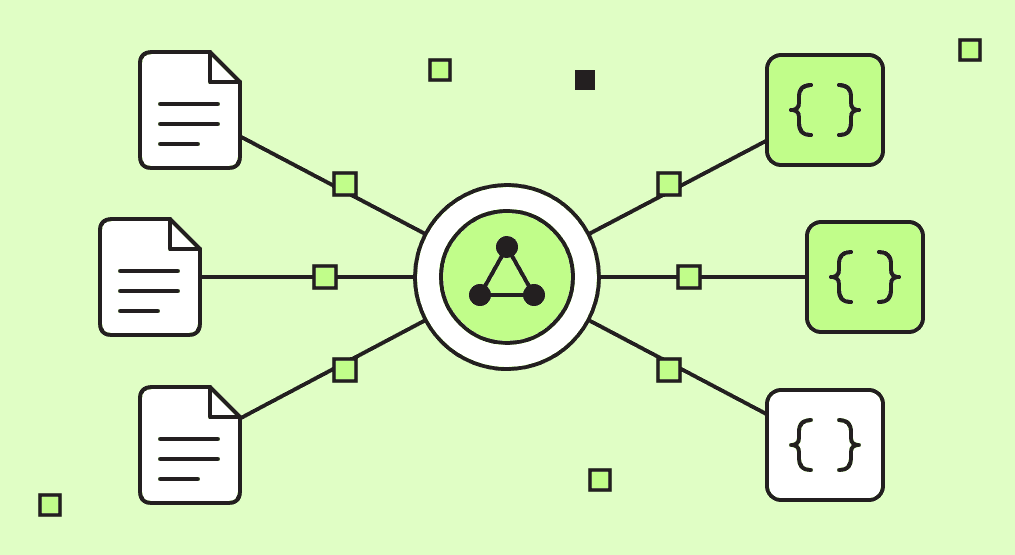
Both routes land in the same Flexpa FHIR API endpoints. A patient can connect both for the same app, and each connection is its own patient authorization.
For a TEFCA connection, start with the documents. This returns Labcorp's C-CDAs along with documents from other matching facilities:
curl "https://api.flexpa.com/fhir/DocumentReference?patient=$PATIENT_ID" \
  -H "Authorization: Bearer $ACCESS_TOKEN"
Then read structured lab results. For Quest, these come straight from Quest's API. For Labcorp, they come from C-CDA to FHIR conversion when your plan includes it:
curl "https://api.flexpa.com/fhir/Observation?patient=$PATIENT_ID&category=laboratory" \
  -H "Authorization: Bearer $ACCESS_TOKEN"
To tell sources apart, use the Flexpa tags in meta.tag. PatientAuthorizationId identifies the connection a resource came from, and AuthorizationType records how it was authorized: OAUTH for a sign-in source like Quest, IAL2 for records retrieved natively over the national exchange. Don't rely on meta.source for TEFCA resources. Our network docs explain why.
A few things to plan for:
- TEFCA is enabled per application. Email partnerships@flexpa.com to turn it on. Structured FHIR from Labcorp's documents also needs C-CDA to FHIR conversion on your plan. Without it, read the documents through DocumentReference. Quest is a provider connection, listed in the endpoint directory.
- Lab values aren't always comparable. Methods, units and reference ranges differ between labs. Keep the lab's own reference range with each value.
- Agents get the same data. An assistant connected through the Flexpa records MCP server can read the same lab results once the patient authorizes. Our lab results guide shows what patients can ask.
- Results can be shared onward. Patient/$summary builds an International Patient Summary from a patient's connected records, and a SMART Health Link can carry it to a new clinician. See IPS and SMART Health Links.
Frequently asked questions
Can I share my Quest Diagnostics lab results with an app?
Yes. Through Flexpa, search for Quest Diagnostics, sign in to your Quest account on Quest's page, and approve access. Flexpa retrieves your available results and shares them only with the app you authorized.
Can I share my Labcorp lab results with an app?
Yes, through the national exchange (TEFCA). Verify your identity once with CLEAR, ID.me or Persona, and Flexpa retrieves documents from Labcorp and other facilities where you've been seen.
Why do Quest and Labcorp connect differently?
They make results available to patients' apps over different networks. Quest offers its own FHIR API. Labcorp participates in TEFCA. Flexpa connects to both, and apps read the results from one API.
Do I need to connect both labs?
Only the labs that ran your tests. If you're not sure, connect both. The TEFCA connection also brings in records from other participating facilities.
Does my health plan have my lab results?
Usually not the values. Claims show that a test was billed, and only sometimes include the result. Connect the lab, or the portal where the test was ordered, for the numbers.
Is it free for patients?
Yes. Flexpa is free for patients.